Guides
NVR vs DVR: What's the Difference in Security Camera Systems? | InFront Technologies
A clear explanation of NVR and DVR security camera systems.


NVR vs DVR: Key Differences for Choosing the Right Security System
An NVR records IP cameras over Ethernet. A DVR records analog cameras over coaxial cable. For a new install, an NVR with Power over Ethernet is the better system: one cable carries power and video, the cameras can be higher resolution, and the system is easier to add to later. If the property already has working coaxial cable, a DVR is often the right choice, because you can keep that cabling and replace the recorder and cameras.
This guide compares cabling, picture quality and audio, and when each recorder is the right buy in Australia. If you are choosing a whole system, start with our home CCTV guide or our small business CCTV guide.
Cabling Differences: Coaxial for DVR vs Ethernet for NVR
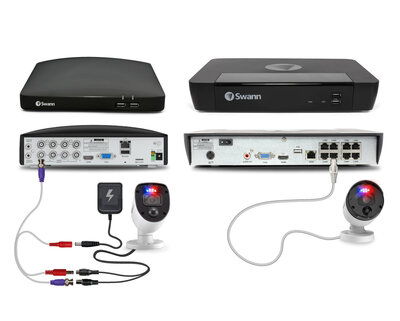
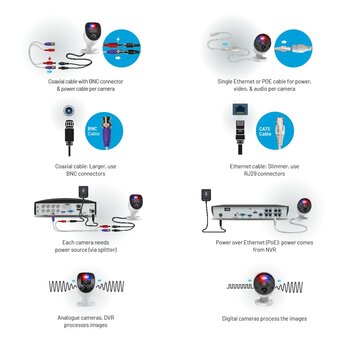
The key difference between DVR and NVR systems lies in the type of cabling they use. DVRs require coaxial cables, which are thicker and designed for older analog systems. While these cables can handle standard resolution, they may struggle with the higher bandwidth demands of modern high-definition cameras. Ethernet cables, used by NVR systems, are thinner, more flexible, and generally more affordable per meter. They also support Power over Ethernet (PoE), simplifying installation by transmitting both power and data through a single cable.
For those looking to upgrade or install a new system, Ethernet is the ideal choice for modern security setups. We offer a great range of Ethernet cables that can future-proof your installation at a cost-effective rate.
If you already have a coaxial system in place, DVR might still be an option if rewiring isn't feasible, but for those installing from scratch, Ethernet cables and NVR systems provide the best performance and scalability.


DVR Security System – Pros & Cons
Analog high definition has narrowed the picture gap between a good DVR kit and an NVR kit, and a DVR is often the cheaper way to replace an older coaxial system. A DVR is a poor choice when you are running new cable. It is a practical choice when the coaxial cable is already in the walls.
Camera type
DVR kits use analog cameras. The camera sends an analog signal and the recorder encodes it. You cannot mix those cameras onto an NVR without extra hardware.
Cable
DVR cameras use coaxial cable with BNC connectors. The cable does not carry power, so each camera also needs a power lead. Existing coaxial runs can be reused. Picture quality drops on long runs, and audio needs a separate connection.
Recorder
Each camera connects back to the DVR. The recorder does the encoding, and it does not power the cameras, so a power splitter or individual power supplies are part of the job.
Where a DVR still makes sense
Keep a DVR if you are replacing a failed recorder, upgrading a Swann kit on the same cable, or you cannot pull Ethernet. We stock Swann camera kits and Swann spare parts, including replacement hard drives, power supplies and USB Wi-Fi antennas.

NVR Security System – Pros & Cons (Today's Standard)
An NVR is the system to install when you are running new cable. The cameras are IP cameras: each one encodes its own video and sends it over the network. That is why an NVR handles higher resolutions and analytics more comfortably than a DVR of the same age.
Camera type
IP cameras can include a microphone, motion analytics and, on many current models, colour night vision. The recorder stores and plays the footage. It does not have to encode every camera itself.
Cable
Use Ethernet, Cat5e or Cat6. Power over Ethernet sends power and data down the same cable, so there is no separate power lead at the camera. Some Swann kits ship with a lighter 4-core lead. It can work, but a full 8-core Ethernet cable is the better run for higher resolutions and for cameras you might add later.
Flexibility
Cameras do not all have to sit on one length of coax back to a box. On the same network they can be added at doors, sheds and outbuildings, including a wireless camera where a cable is not practical. For channel count and storage, see how to choose an NVR for an 8-camera system.
Picture and audio
The NVR receives a digital stream, so the picture is not limited by an analog encode at the recorder. A camera with a microphone can record audio without a second cable.
In Summary – DVR vs. NVR System
Choose an NVR when you are cabling a home or business from scratch, or when you can pull Ethernet. You get PoE, easier expansion and a clearer path to more cameras later. Choose a DVR when coaxial cable is already installed and working. Replacing that cable is often more expensive than the recorder.
A DVR kit can be the lower quote. An NVR costs more up front and is the one we fit on new jobs. If you want a short list, use the best CCTV systems for home and best CCTV systems for small business guides.
Do I have to throw away a working DVR?
No. If the cameras and cable are fine, replace the hard drive or the power supply and keep it. A new NVR means new cameras and new cable.
Can I plug my old cameras into an NVR?
Not directly. Analog cameras belong on a DVR. IP cameras belong on an NVR.
What should a new install use?
An NVR with PoE, sized for the cameras you have now plus a couple of spare channels. Eight-camera systems are covered in the NVR sizing guide.
Checkout the Latest in NVR's from IVSEC - Highly Recommended